Bespoke website pricing calculators

Clearer prices for your customers.
Better enquiries for your business.

Give visitors useful pricing guidance before they enquire. Probeck builds bespoke online pricing and quote calculators around your services, your pricing rules and the information your sales process needs.

Help people understand their options, check their budget and choose whether to take the next step.

Previous work

A pricing calculator connected to the quotation process.

Emerald Sky Accounts uses one pricing system for customers exploring services online and staff preparing tailored quotations during discovery calls.

Accountancy pricing calculator

Emerald Sky Accounts

A bespoke calculator for selecting services, applying pricing rules and reviewing recurring and one-off charges.

Outcome: The same system supports customer-generated proposals and quotations prepared internally during discovery calls.

Read the case study

Answer the question customers already have

A useful price, even when there isn't one fixed price.

A website pricing calculator asks relevant questions and applies your business's pricing rules to show an estimated price, a range or a suitable package.

Visitors might choose services, quantities, measurements, packages and optional extras. Conditional questions can appear only when an answer makes them relevant. Explain what increases or reduces the price, what is included and what still needs checking.

A bespoke calculator is designed around how you price work. It can be a small addition to an existing website or a more involved quotation system, rather than a generic plugin forcing your offer into someone else's formula.

The result should help someone decide whether the service fits their needs and budget. Show useful guidance before asking for contact details, and make any assumptions or exclusions clear.

Try the idea

Change an option. See what changes.

This fictional workshop calculator demonstrates the experience. It is not a customer project, a real service offer or Probeck's pricing.

A deliberately simple example.

The fictional rules are £100 setup, then £40 per attendee for 1–30 people. Optional materials add £8 per person; refreshments add £12 per person. These illustrative figures have no real-world tax or quotation basis.

For 10 attendees with materials and no refreshments: £100 setup, £400 attendance and £80 materials produce a fictional total of £580.

Your calculator could instead work with measurements, minimum charges, conditional options, packages or a price range. The questions and calculation would follow your validated rules.

Between marketing and sales

From a pricing question to a useful conversation.

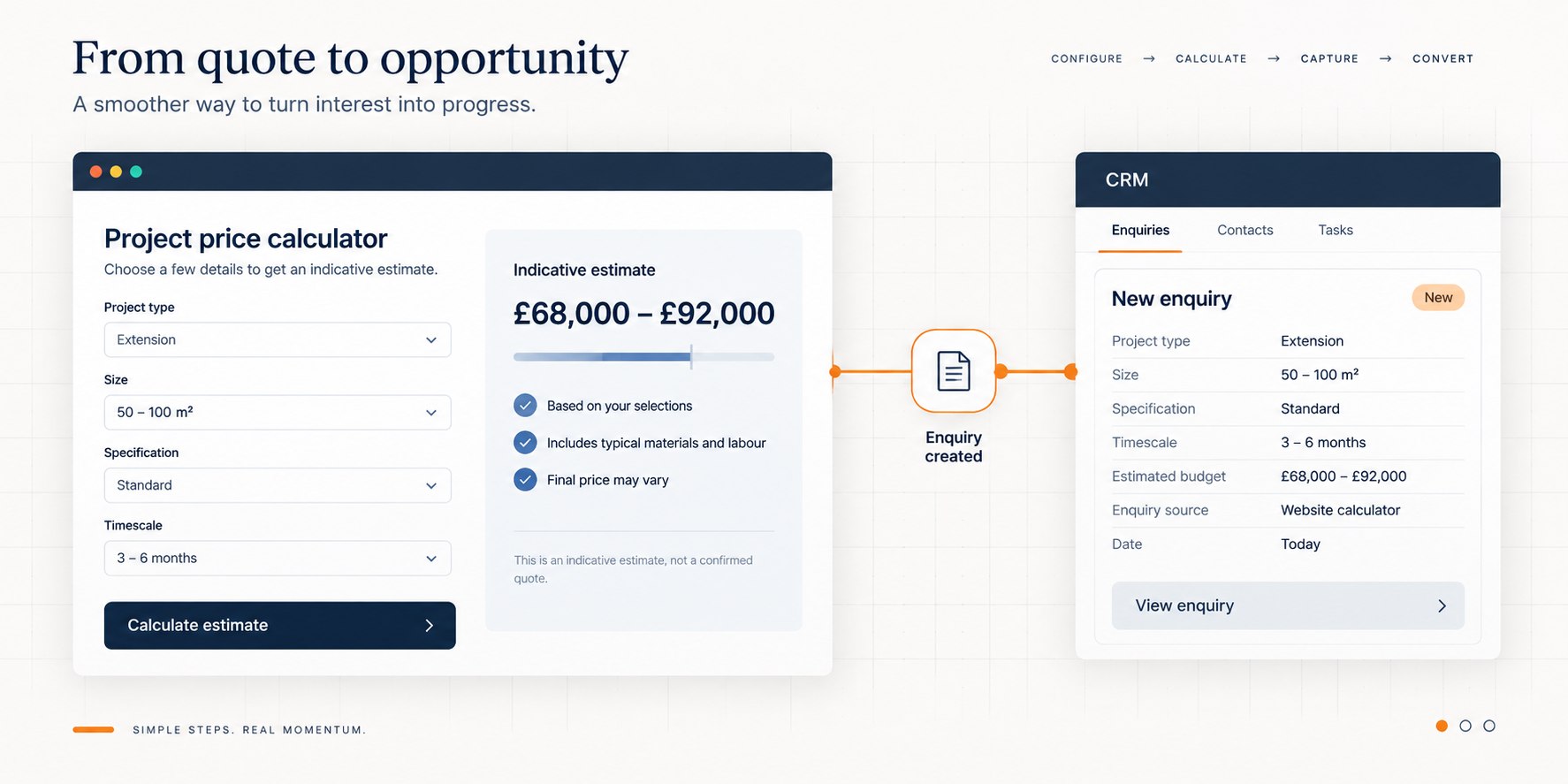
Illustrative flow from a website price calculator to a new CRM enquiry
  1. 01

    Answer questions

    The visitor explains what they need through relevant, manageable choices.

  2. 02

    Apply your rules

    Quantities, packages, options and extras shape the calculation.

  3. 03

    Show useful guidance

    A price, range or suitable package makes the likely cost clearer.

  4. 04

    Let them choose

    The customer decides whether to continue with an enquiry.

  5. 05

    Pass on the detail

    Agreed information enters a CRM, business system or notification.

Useful for both sides

Spend your time on the right enquiries.

A useful enquiry starts with more than a name and “please send a quote”.

Ask enough to establish what someone needs, where the work is, their timescale and whether the likely cost fits. Explain why a question matters, and avoid asking for information you do not need.

Fewer dead-end enquiries. Better conversations.

Some visitors need a service you do not provide, are outside your service area, have a different budget or are still exploring. Clear guidance helps them work that out without a phone call, meeting or repeated follow-up.

If the price is appropriate, they can continue with a clearer brief. If it is not, they have still received a useful answer. Qualification should help people find a suitable next step, not pressure them to enquire.

A more useful enquiry can contain: requirements, selected options, indicative price, budget, location and timescale. Sales can start with that context rather than asking the customer to repeat everything.

Connect the next step

An enquiry doesn't have to stop in an inbox.

A calculator can potentially create a lead in your existing customer relationship management (CRM) system, with the information needed to follow it up.

Agree what the sales process needs.

When the visitor chooses to continue, the handover could include contact details, service required, selected options, indicative value, budget, timescale, location and qualifying answers. Source information can be included where available and appropriate to the visitor's consent choices.

Integration depends on your systems, available APIs, access permissions and any provider charges. Those need checking before promising a connection. An email notification or supported export may be the practical alternative.

Plan how duplicate enquiries, failed deliveries and changes to pricing are handled. Submitted selections and prices need validation before they enter a live sales or quotation workflow.

For wider business workflows, explore App Development. For the surrounding customer journey, see Website Design & Development.

Automation & integrations
Is it worth building?

Sometimes the best answer is a price list.

Calculator

A calculator may be a good fit when…

  • Your pricing follows definable rules, with several options affecting cost.
  • Customers regularly ask about price and staff prepare similar quotations repeatedly.
  • Enquiries often need qualification before a conversation is useful.
  • Website leads need entering into a CRM or other system by hand.

Compare the likely use and administrative benefit with the build and ongoing maintenance costs.

Simpler route

A simpler approach may serve you better when…

  • A published price list already answers the question clearly.
  • Every quotation is genuinely unique and no meaningful rules or ranges can represent it.
  • Sales volume is too low to justify the investment.
  • The development and upkeep would cost more than the likely business benefit.

Written pricing guidance or a better enquiry form may be enough. A calculator cannot fix unclear or inconsistent pricing rules.

Useful content around a useful tool

Help people understand the price, however they find you.

Support your pricing content and SEO.

A calculator can complement pages answering “[service] cost” and “[service] prices”. Combine it with typical costs, assumptions, price factors, comparisons and FAQs to answer the visitor's question in context.

That creates a useful destination for internal links from service pages and the Knowledge Centre. Interaction can help people explore their options; it is not a promise of better rankings or conversions.

Keep written guidance available alongside the tool. The calculator should add to a useful page rather than replace the explanation.

Explore Probeck's content and marketing support

Make information clear for AI-assisted discovery.

Keep services, options, pricing factors and common answers in readable HTML, with descriptive headings and useful links. Do not leave all the meaning behind JavaScript inputs.

Use structured data only where valid and consistent with visible content. Google's guidance for its AI search features also emphasises accessible text and established SEO practices; no special AI schema is required.

Clear content helps communicate the offer to people and systems. It does not guarantee indexing, AI inclusion or a recommendation from ChatGPT or another service.

Google's guidance on AI search features (opens in a new tab)

Budget for the work involved

What does a pricing calculator cost?

A few questions and a simple estimate involve different work from a quotation system with saved results, administration tools and CRM integration.

Starting price

Pricing calculators from

£3,250

The final price depends on the rules, interface, integrations and administration requirements.

The fictional demo above illustrates the customer experience and is unrelated to development costs.

What drives the build cost?

Number of questions and options, conditional logic, pricing-rule complexity, design and accessibility requirements, and the work needed to fit the existing website.

CRM or other API connections, PDF quotations, email automation, saved quotes and an administration interface add scope. Analytics requirements also need defining.

What needs an ongoing budget?

Hosting where needed, maintenance, integration or email-provider charges, monitoring and changes to your pricing rules.

Agree which rules you can update yourself, who tests changes and how support is arranged. Confirm inclusions, optional extras and recurring charges before the build.

How the project works

Start with how you price the work.

You do not need a technical specification. You do need someone who understands the pricing and can validate real examples, including exceptions.

  1. 01

    Understand and map

    Review how quotations work today. Map rules, minimum charges, exceptions and the questions that establish suitability.

    Your partSupply price lists, worked examples, exclusions and the person responsible for confirming the rules.

  2. 02

    Plan the customer journey

    Agree what visitors see, whether the result is a price or range, and what is passed to sales. Check integration access and scope.

    Your partConfirm qualification criteria, required CRM fields, result wording and what happens after an enquiry.

  3. 03

    Design, build and connect

    Create the interface, implement the rules and integrate it into the website. Add agreed notifications or system connections.

    Your partProvide appropriate website and system access, and review the questions, presentation and handover.

  4. 04

    Validate real scenarios

    Test expected quotes, boundaries, unusual combinations, mobile use and failed submissions. Check the sales handover end to end.

    Your partCompare results against your own calculations and approve the rules and assumptions before launch.

  5. 05

    Launch, monitor and maintain

    Agree ownership of updates, monitor operation and review customer feedback. Re-test when prices, services or connected systems change.

    Your partKeep pricing current and flag changes. Agree support responsibilities and how new rules will be approved.

Timing depends on rule complexity, integrations, access and the speed of validation. Agree a delivery plan once those are understood, rather than assuming every calculator takes the same time.

Questions before you build

What would this mean for your website?

Can a pricing calculator work with complicated pricing?

Yes, where the rules and exceptions can be defined and tested. Conditional questions, thresholds and dependencies are possible. If human judgement is essential, show a range or identify the point where a manual review is needed.

Does it have to show an exact price?

No. It can show an estimate, a starting point or a suitable package. Explain what is included, what is excluded and which details need confirming before a formal quotation.

Can it show a price range instead?

Yes. Define meaningful lower and upper limits and explain what determines the final price. A range should come from your pricing evidence, not an arbitrary percentage added to a total.

Can the calculator send leads into our CRM?

Potentially. It depends on the CRM, its supported API or import options, permissions and required fields. Check those first and agree how delivery failures and duplicate records will be handled.

Can it generate a quotation?

Quote documents or PDFs can be part of the scope. Agree whether the output is indicative or a formal offer, its assumptions, validity period and any approval required before it is issued.

Can customers email themselves the result?

Yes, that can be included with an email delivery service and a clearly explained email field. Sending a requested result should not depend on agreeing to marketing. The demonstration on this page does not send email.

Can it work with our existing website?

Often, subject to access, the platform and its technical constraints. A calculator may be added to an existing page or hosted separately with an appropriate connection. A full website rebuild is not automatically required.

Can it be added to WordPress?

Yes. Probeck would normally host the calculator separately and embed it into a WordPress page using an iframe, rather than build it as a WordPress plugin. The calculator can be styled to match the website while its code and updates remain separate from WordPress.

Will the calculator help SEO?

It can support a useful pricing page, but adding a tool does not guarantee rankings. Keep written prices or ranges, cost factors, assumptions and FAQs around it so the page answers the question without relying entirely on interaction.

Can AI and search engines understand the calculator?

Do not assume they will complete the questions or discover every result. Publish useful explanations and representative pricing guidance on a page. Clear structure helps understanding, but cannot guarantee inclusion in search or AI answers.

Can we track which options people select?

Analytics can be included to understand usage and where people stop. Agree the events, consent behaviour and retention first, and avoid putting personal or sensitive enquiry details into analytics. Tracking is not included in this demo.

Can the pricing rules be updated later?

Yes. Agree whether updates will be made through an administration screen, an agreed data source or development support. An editing interface adds work and needs validation to prevent accidental pricing errors.

What happens if our pricing changes?

Update the approved rules and re-test representative quotes before making them live. Decide how saved estimates and previously issued quotations will be treated so visitors and sales staff know which prices apply.

The Knowledge Centre

More answers about pricing and enquiries.

Use these published pricing and CRM guides to explore the options in more detail.